Lenovo LOQ 15IRX9 83DV018LIN Gaming Laptop vs Asus ROG Strix G16 G614JU-N4200WS Gaming Laptop
Quick Comparison
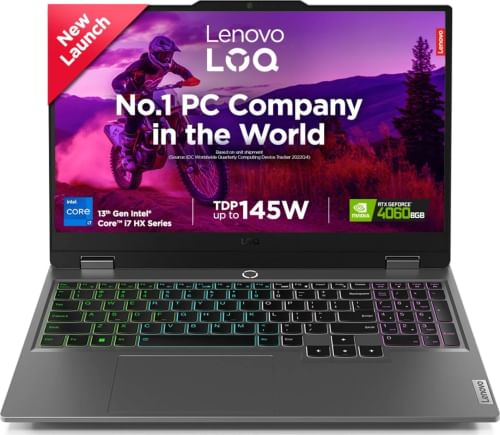
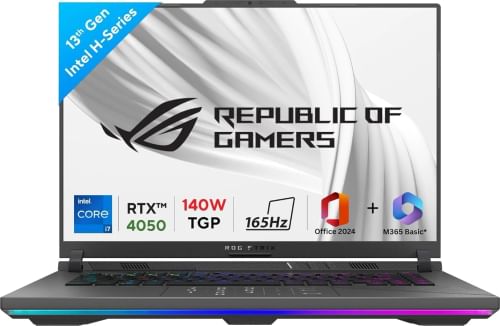
| Name | Lenovo LOQ 15IRX9 83DV018LIN Gaming Laptop | Asus ROG Strix G16 G614JU-N4200WS Gaming Laptop |
| RAM | 24 GB | 16 GB |
|---|---|---|
| Display | 15.6 in | 16 in |
| Processor | Intel Core i7 | Intel Core i7 |
| Graphics Card | NVIDIA GeForce RTX 4060 | NVIDIA GeForce RTX 4050 |
| Price | Rs. 104990 | Rs. 113990 |
Related Products
Detailed Comparison
Price And Launch
The cost of Lenovo LOQ 15IRX9 83DV018LIN Gaming Laptop is Rs. 104990. The cost of Asus ROG Strix G16 G614JU-N4200WS Gaming Laptop is Rs. 113990.
Display comparison
Asus ROG Strix G16 G614JU-N4200WS Gaming Laptop features larger screen size of 16 in inches in comparison to Lenovo LOQ 15IRX9 83DV018LIN Gaming Laptop's 15.6 in inch screen. Lenovo LOQ 15IRX9 83DV018LIN Gaming Laptop has IPS Screen type whereas Asus ROG Strix G16 G614JU-N4200WS Gaming Laptop has IPS-level Screen type. Asus's laptop has display density of 142 PPI & Lenovo's laptop has only 141 PPI display density
Memory comparison
Lenovo LOQ 15IRX9 83DV018LIN Gaming Laptop's larger 24 GB RAM is better for playing games and all with respect to Asus ROG Strix G16 G614JU-N4200WS Gaming Laptop's lower 16 GB RAM. RAM of first laptop could be upgraded to 32 GB and that of second laptop could be upgraded to 32 GB.
Processor Comparison
Both laptops feature Core i7 processor Both Laptops have CPU Cache of 24 MB.
Related Comparisons

Full Comparison
| Name | Lenovo LOQ 15IRX9 83DV018LIN Gaming Laptop | Asus ROG Strix G16 G614JU-N4200WS Gaming Laptop |
| General | ||
| Series | LOQ | ROG Strix G16 |
| Model | 15IRX9, 83DV018LIN | G614JU-N4200WS |
| Utility | Gaming | Gaming |
| Device Type | Netbook | Netbook |
| OS | Windows 11 (64-bit) | Windows 11 Home (64-bit) |
| Dimensions | 359.86 x 258.7 x 21.9 mm | 354 x 264 x 30.4 mm |
| Weight | 2.38 kg | 2.5 kg |
| Warranty | 1 year Warranty | 1 year Warranty |
| Display | ||
| Type | IPS | IPS-level |
| Touch | No | No |
| Size | 15.6 inches | 16 inches |
| Resolution | 1920 x 1080 pixels | 1920 x 1200 pixels |
| PPI | ~ 141 PPI | ~ 142 PPI |
| Refresh Rate | 144 Hz | 165 Hz |
| Aspect Ratio | 16:10 | |
| Anti Glare Screen | Yes | Yes |
| Features | 300nits, 100 % sRGB, G-SYNC | 250, 1000:1, 72% 100% 75.35% display |
| Dual Display | No | |
| Connectivity | ||
| Ethernet | Yes | Yes |
| WiFi | Wi-Fi 6, 802.11ax 2x2 | Wi-Fi 6E(802.11ax) (Triple band) 2*2 |
| Bluetooth | v5.2 | v5.3 |
| USB Ports | 1 x USB Type-C, 3 x USB 3.0 | 2 x USB Type-C, 2 x USB 3.0 |
| Thunderbolt | Yes | |
| HDMI | 1 x HDMI 2.1 Port | 1 x HDMI Port |
| Microphone In | Yes | Yes |
| Headphone Jack | Yes | Yes |
| Input | ||
| Camera | FHD Camera with E-shutter | Yes |
| Keyboard | 4-Zone RGB Backlit, English | Backlit Chiclet Keyboard 4-Zone RGB, Yes |
| Keyboard Backlit | Yes | Yes |
| Touchpad | Yes | Yes |
| Inbuilt Microphone | Dual Array Digital Microphones | Built-in array microphone |
| Speakers | 2w x2 | 2-speaker system with Smart Amplifier Technology |
| Sound | Nahimic Audio | Dolby Atmos |
| Optical Drive | No | No |
| Processor | ||
| Processor | 13th Gen Intel Core i7 13650HX | 13th Gen Intel Core i7 13650HX |
| Speed | 6 x (Turbo Speed upto 4.9 GHz) Performance Cores 8 x (Turbo Speed upto 3.6 GHz) Efficient Cores | 6 x (Turbo Speed upto 4.9 GHz) Performance Cores 8 x (Turbo Speed upto 3.6 GHz) Efficient Cores |
| Cores | 14 Cores (6P + 8E) | 14 Cores (6P + 8E) |
| Cache | 24 MB | 24 MB |
| Brand | Intel | Intel |
| Series | Core i7 | Core i7 |
| Model | 13650HX | 13650HX |
| Generation | 13th Gen | 13th Gen |
| Graphics | ||
| GPU | NVIDIA GeForce RTX 4060 | NVIDIA GeForce RTX 4050 |
| Dedicated Memory | GDDR6 8 GB | GDDR6 6 GB |
| Brand | NVIDIA | NVIDIA |
| Memory | ||
| RAM | 24 GB DDR5 | 16 GB DDR5 |
| RAM Bus Speed | 4800 MHz | 4800 MHz |
| Maximum RAM Supported | Upto 32 GB | Upto 32 GB |
| Solid State Drive | 512 GB SSD | 1 TB SSD |
| SSD Interface | NVMe | NVMe |
| Battery | ||
| Battery | 60 Wh Battery | 90 Wh, 4 Cell Battery |
| Adapter Type | 230W Slim Tip (3-pin) | 280W AC Adapter |
| Battery Backup | Upto 6 hours | |
| Battery Details | 90WHrs | |
| Extra | ||
| Included Software | Office Home 2024 | |
| Sales Package | 1 x Laptop, 1 x Power Adapter, 1 x Warranty Card, 1 x User Manual | Laptop, battery, power adapter, user guide |